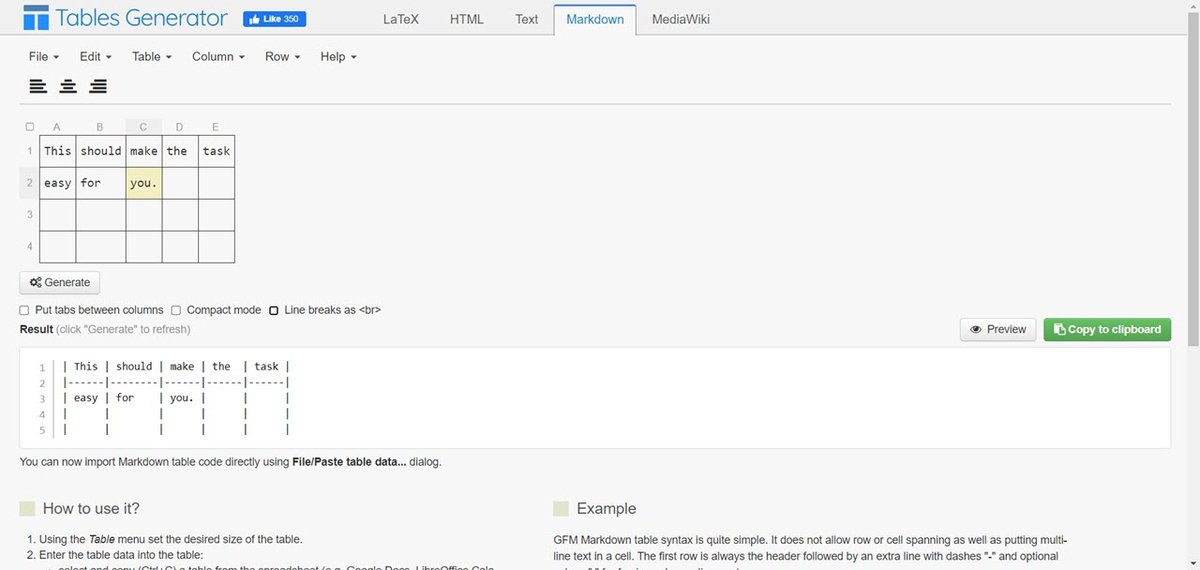
In the world of technical documentation, software development, and content creation, presenting data clearly and efficiently is paramount. Markdown tables have emerged as a ubiquitous solution, offering a lightweight yet powerful way to structure information within README.md files, wikis, issues, and a multitude of other markdown-supported platforms. However, crafting these tables by hand, especially for complex datasets, can quickly become a tedious and error-prone task. This is where a markdown table generator becomes an indispensable ally, transforming the complexity of manual formatting into a streamlined, intuitive process.
This flagship guide will illuminate the profound impact a markdown table generator can have on your workflow. We'll explore everything from the fundamental syntax to advanced formatting, platform-specific optimizations, and the best tools available, ensuring you can create impeccable tables with minimal effort.
The Indispensable Role of Markdown Tables in Modern Content
Structured data is the backbone of clear communication, whether you're outlining API parameters, comparing product features, or simply organizing information for a project. Markdown tables excel in these scenarios, providing a clean, readable format that integrates seamlessly into markdown documents. They are particularly favored in environments like GitHub, where well-formatted README.md files significantly enhance project clarity and user experience.
The core strength of markdown tables lies in their simplicity: pipe symbols (|) define columns, and dashes (-) create the header separator. This basic structure allows for quick data organization, but knowing the nuances can truly elevate your content. To truly grasp the building blocks and essential patterns, you'll want to Learn Markdown table fundamentals for a solid foundation.
Mastering Markdown Table Creation Beyond the Basics
While the basic syntax is straightforward, markdown offers surprising flexibility for presenting data effectively. You can control column alignment (left, center, or right) with colons in the header separator row, ensuring your data looks precisely as intended. Moreover, GitHub Flavored Markdown (GFM), widely adopted across many platforms, extends these capabilities further, allowing for inline code formatting within cells using backticks and even basic markdown elements like bold or italic text.
For those looking to push the boundaries of standard table presentation, advanced techniques become crucial. This includes escaping pipe characters within cells using the HTML entity | to prevent unintended column breaks, or incorporating line breaks within cells using <br> tags for better readability. These methods allow you to maintain structured data even with content that might otherwise disrupt the table's integrity. To dive deep into these sophisticated options and truly make your tables shine, consider exploring how to Master advanced Markdown table formatting Elevate your output.
Elevating Visuals: Styling and Customization
While markdown itself focuses on content structure over aesthetic design, there are ways to influence how your tables appear, especially when rendered in a web context. Understanding how platforms interpret markdown and leveraging accompanying styles can transform a functional table into a visually appealing one. For projects hosted on platforms where you control the CSS, you gain an even greater degree of customization.
Imagine a table that not only organizes data but also aligns perfectly with your brand's visual identity. Whether through platform-specific styling or by integrating custom CSS, tailoring your tables can significantly enhance user engagement and readability. Discover the powerful techniques and practical approaches to Customize Markdown tables using CSS and bring your documentation to life.
Why a Markdown Table Generator is Your Best Friend
Manually typing pipes and dashes, ensuring correct alignment, and meticulously counting characters for consistent column widths is, frankly, a chore. It's a prime candidate for automation, and that's precisely where a markdown table generator proves invaluable. These tools provide a graphical interface or intelligent text processing that allows you to:
- Set Up Structure: Easily define the number of rows and columns, just like in a spreadsheet.
- Fill In Data: Input your header and data cells in a user-friendly environment.
- Set Column Alignment: Click a button or select an option to apply left, center, or right alignment instantly.
- Export: Copy the perfectly formatted markdown table with a single click, ready for immediate use.
This dramatically reduces the time spent on formatting and virtually eliminates syntax errors. Instead of wrestling with|and-, you focus on the content itself. To find the tool that best fits your workflow and specific needs, it's highly recommended to Compare Markdown table generators and select your ideal companion.
Navigating Compatibility and Platform-Specific Considerations
One of the strengths of markdown tables is their widespread adoption, but it's important to acknowledge that rendering can vary slightly across different platforms. GitHub, for instance, offers robust support for tables in issues, pull requests, wikis, and README files, making it a reliable environment. However, other platforms like Slack may not fully support standard markdown tables in messages, often requiring them to be embedded within code blocks or converted to images for consistent display.
Furthermore, while markdown tables are incredibly versatile, they do have limitations. Standard markdown tables, for example, do not support merged cells (rowspan/colspan), which can be a critical consideration for complex layouts. In such cases, converting your data to an HTML table or restructuring your information might be necessary. Understanding these nuances is key to ensuring your tables look great wherever they're published. To master these intricacies and prevent unexpected formatting issues, make sure to Optimize Markdown tables for platforms you frequent.
Bridging Data Formats: CSV, Excel, and Markdown
The flexibility of data interchange is another powerful aspect. If you have data in a CSV file, many markdown table generators can import it directly, or you can manually replace commas with pipes to form a basic markdown table structure. Conversely, transforming a markdown table into an Excel spreadsheet or Google Sheet is remarkably simple: just copy and paste, and most spreadsheet applications will intelligently recognize the pipe-separated data. For more structured conversions, you can save the markdown table as a CSV by replacing pipes with commas, facilitating direct import into Excel.
Embrace the Simplicity of Structured Data
Markdown table generators empower you to create clean, organized, and professional-looking tables without the headache of manual formatting. By automating the tedious aspects of syntax, alignment, and structure, these tools free up your time to focus on the content itself, ensuring your documentation, READMEs, and technical articles are always clear, precise, and easy to read. Adopt a markdown table generator today and elevate the quality and efficiency of your structured data presentation across all your projects.